
Keyboard Ghosting Test – Anti-Ghosting Checker (2026)
Keyboard ghosting test – find dropped keys in 10 seconds
Hold WASD + Shift + Space right now. Every key that turns green registered. Any key that stays dark while you’re holding it is being blocked – that’s ghosting. Your keyboard isn’t broken. Its scan matrix can’t distinguish that specific combination, so it suppressed the input.
🔒 Privacy Notice: This Keyboard Ghosting Test tool detects keystrokes locally in your browser. No keypress data is recorded, stored, or sent to any server.
Hold each combination down all at once. Green means the key registered alongside the others. If a key stays grey while you are definitely holding it, your keyboard is blocking that combination — that is ghosting, and it is what loses you a fight in a game.
Release everything between attempts. Some combinations are blocked by the operating system rather than the keyboard — if a combination fails in one browser, retry it in another before blaming the hardware.
How to use the anti-ghosting test
- Pick a combo from the panel. Start with WASD + Space + Shift, the most commonly ghosted gaming combination.
- Hold all keys in that combo simultaneously. Keep every key pressed down at the same time.
- Watch the panel. Green = key registered. Dark while held = key is blocked or ghosted.
- Try every combo in the panel to cover all common gaming key groups.
- Press Reset to clear results and test on a different connection type or keyboard.
Test on USB and wireless separately if your keyboard supports both. Ghosting behavior often differs between connection types.
What your result means
All keys in the combo turn green: No ghosting on that combination. Your keyboard’s scan matrix registers every key in that combo correctly. You won’t lose inputs when using these keys together in games.
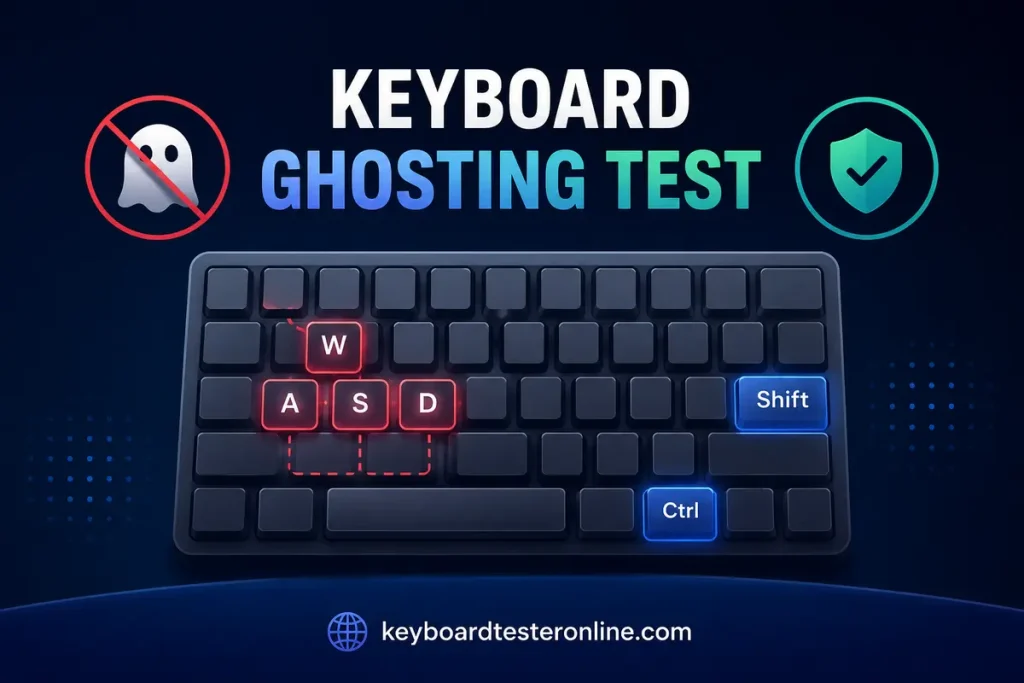
One key stays dark while held: That key is being blocked. The keyboard detected a phantom-key risk from the scan matrix geometry and suppressed that specific key’s signal rather than send a false input. The key itself works. Press it alone and it lights up immediately. The problem is that specific combination, not the key hardware.
Different keys block depending on which combo you test: Your keyboard has selective anti-ghosting. Only certain predefined combinations are protected. Combinations outside those paths ghost or block. This is the most common situation on budget gaming keyboards that advertise “anti-ghosting” without listing NKRO on the spec sheet.
All combos pass: Your keyboard has genuine per-key diode anti-ghosting. Every combination registers correctly because each key has an electrical diode that isolates it from every other key in the matrix. No sneak paths, no phantom signals, no suppression needed.
Why keyboard ghosting happens: the scan matrix explained
Every keyboard uses a scan matrix, a grid of rows and columns where each key sits at a unique intersection. The keyboard controller scans each column in sequence, checks which rows return a signal, and maps that to a keypress.
The problem appears when three keys form an L-shape on that grid. When keys at (Row 0, Col 0), (Row 0, Col 1), and (Row 1, Col 0) are all held simultaneously, current flows backward through the matrix: from Row 1 through the pressed switch at Col 0, into Col 0, through the pressed switch at Row 0, into Row 0, and out through Col 1. The controller reads a signal at (Row 1, Col 1) even though nobody pressed that key. That’s a phantom keypress.
The keyboard handles this one of two ways:
- Report the phantom: true ghosting, where a key appears pressed that nobody touched
- Block the combination: suppress the full combo rather than send a false signal
Most modern keyboards choose suppression over phantom reporting, which is why you experience a key that does nothing rather than a key that fires on its own. Both behaviors come from the same root cause: the L-shaped matrix path.
What anti-ghosting actually means on a spec sheet
Anti-ghosting without NKRO on the spec sheet almost always means selective anti-ghosting. The manufacturer identified which specific combinations their matrix handles safely and hard-coded protection for those paths. WASD plus adjacent keys are protected. Keys outside that zone may still block.
Anti-ghosting with NKRO means per-key diodes are installed on every switch position. Each diode blocks the backward current path that creates phantom signals, so the controller reads every key independently regardless of which others are held. This is hardware-level anti-ghosting. No combination ghosts because no sneak paths exist in the circuit.
How to confirm which type your keyboard has: Run the combinations in this ghosting test that go beyond the WASD cluster: number row keys, function row, and keys on the right side. A keyboard with genuine per-key diode anti-ghosting handles all of them. A keyboard with selective anti-ghosting blocks outside its predefined zones.
Gaming combos this test checks and why they matter
| Combo | Keys held | Why it matters |
|---|---|---|
| WASD + Space + Shift | 6 keys | Standard FPS movement, most common real-world combo |
| WASD + Ctrl + Space | 6 keys | Sprint + crouch + jump, fails on most 4KRO boards |
| Arrows + Ctrl + Shift | 6 keys | Alt movement bindings, arrow cluster uses a separate matrix zone |
| QWER + Space + Shift | 6 keys | RTS / ability spam, different matrix zone from WASD |
Each combo is pre-loaded in the test panel. The tool highlights exactly which key in each combo stays dark. That tells you precisely which key the keyboard is suppressing, not just that “something failed.”
Does your wireless keyboard ghost differently than wired?
Yes. The cause is the Bluetooth protocol, not the keyboard hardware.
The Bluetooth HID specification carries a maximum of 6 non-modifier keys per report packet. That’s a protocol ceiling built into the standard. A keyboard that supports full NKRO over USB drops to 6 simultaneous non-modifier keys over Bluetooth because the Bluetooth HID format has no extension point for additional keys.
Keyboards using proprietary 2.4GHz wireless (Logitech LIGHTSPEED, Razer HyperSpeed, SteelSeries Quantum) bypass this limitation. They achieve the same rollover over wireless as over USB because they don’t use the standard Bluetooth HID format.
Run this ghosting test once over USB and once over Bluetooth. If the wireless result shows more blocked combos than wired, the Bluetooth protocol is the ceiling, not the keyboard scan matrix.
Ghosting vs. blocking: what’s the difference?
These two terms are often used interchangeably, but they describe opposite failure modes:
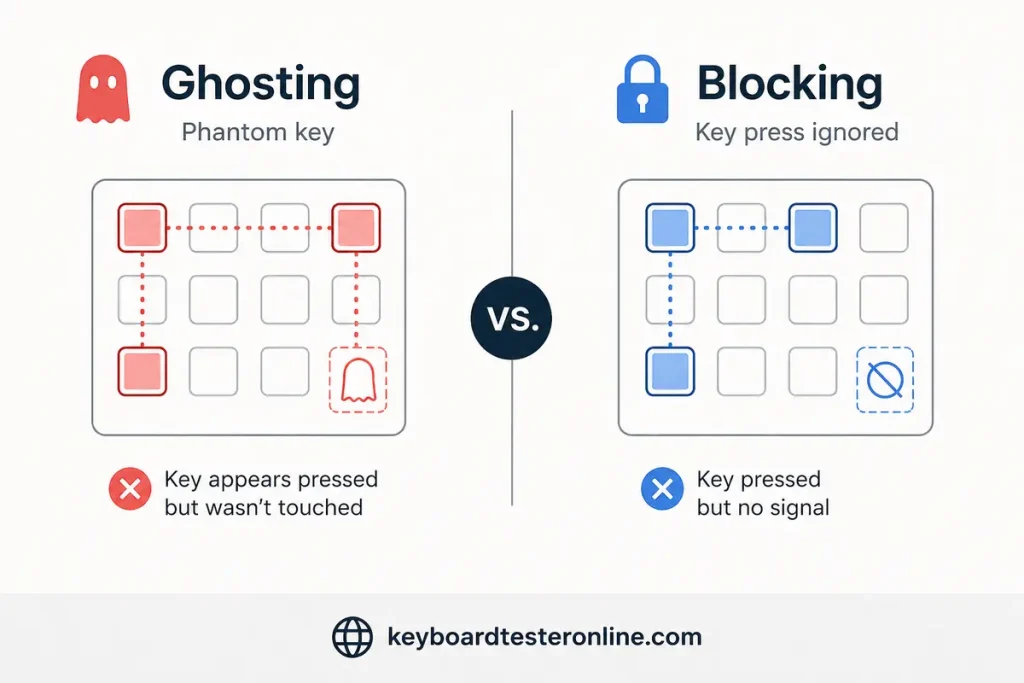
Ghosting (original definition): A key appears pressed on screen when nobody touched it. Current flows backward through the scan matrix and the controller reports a phantom at the fourth corner of an L-shaped key combination.
Blocking (what you actually experience): A key you physically pressed produces no signal. The keyboard detected the L-shaped matrix risk and suppressed the combination rather than risk sending a phantom signal.
Most people today call both problems “ghosting.” This test catches both. A key that stays dark while physically held is either being blocked by the firmware or failing to register due to matrix interference. The fix for both is the same: a keyboard with per-key diodes.
Frequently asked questions
What is keyboard ghosting in gaming?
Keyboard ghosting in gaming means a key you pressed while holding other keys produced no in-game action. The keyboard’s scan matrix couldn’t distinguish that key from the surrounding held keys. Either the firmware suppressed the signal to avoid a phantom, or the scan matrix produced the wrong output. It appears as a key that simply stops responding mid-combo. The same key works perfectly when pressed alone.
How do I fix keyboard ghosting permanently?
The only permanent fix is a keyboard with per-key diodes, sometimes listed as NKRO or true anti-ghosting on the spec sheet. Diodes block the backward current paths that cause the scan matrix L-shape problem. Software, drivers, and firmware updates cannot add diodes to hardware that wasn’t built with them. If your current keyboard ghosts on combos you use regularly in games, a keyboard with confirmed NKRO is the only resolution.
Does anti-ghosting mean NKRO?
Not always. Anti-ghosting is a marketing term that can mean selective protection of specific key zones or full per-key diode isolation. NKRO always means full per-key diodes. If a keyboard lists NKRO with a specific USB implementation note, it has genuine hardware anti-ghosting. If it only says “anti-ghosting” without NKRO, assume selective zone protection and test the combinations outside the WASD cluster with this tool to confirm.
Why does WASD work but my number row blocks during gameplay?
Your keyboard has selective anti-ghosting covering the WASD cluster and immediate adjacent keys. The number row shares a different section of the scan matrix that wasn’t diode-isolated. Combinations that pull keys from both zones, like WASD + a number row ability key, trigger the blocking behavior. This is the most common complaint from players who upgraded from membrane to a budget gaming mechanical keyboard that advertises anti-ghosting.
Can ghosting happen on a mechanical keyboard?
Yes. Per-key diodes prevent ghosting, not the switch type. A mechanical keyboard without diodes ghosts identically to a membrane keyboard with the same matrix geometry. Diodes are a PCB design decision. They add cost and manufacturing steps regardless of switch type. Most quality mechanical gaming keyboards include them, but budget mechanical boards often don’t. Confirm with this test rather than assuming mechanical means ghost-free.
Related keyboard tests
The ghosting test confirms which key combinations your keyboard blocks under simultaneous press conditions. These tests cover the connected performance variables:
- N-key rollover test counts how many keys register simultaneously. Rollover and anti-ghosting are two outputs of the same hardware decision (per-key diodes).
- Keyboard chatter test catches keys that fire twice from one press rather than getting blocked. That’s chatter, not ghosting, and a different switch-level problem.
- Keyboard latency test measures input latency once you’ve confirmed your keyboard registers every key correctly in combination.
Run the keyboard tester first to confirm every key registers individually before testing combinations. Ghosting only becomes relevant once basic per-key registration is confirmed.